Out now
Gain MS
Free mid/side gain · VST3
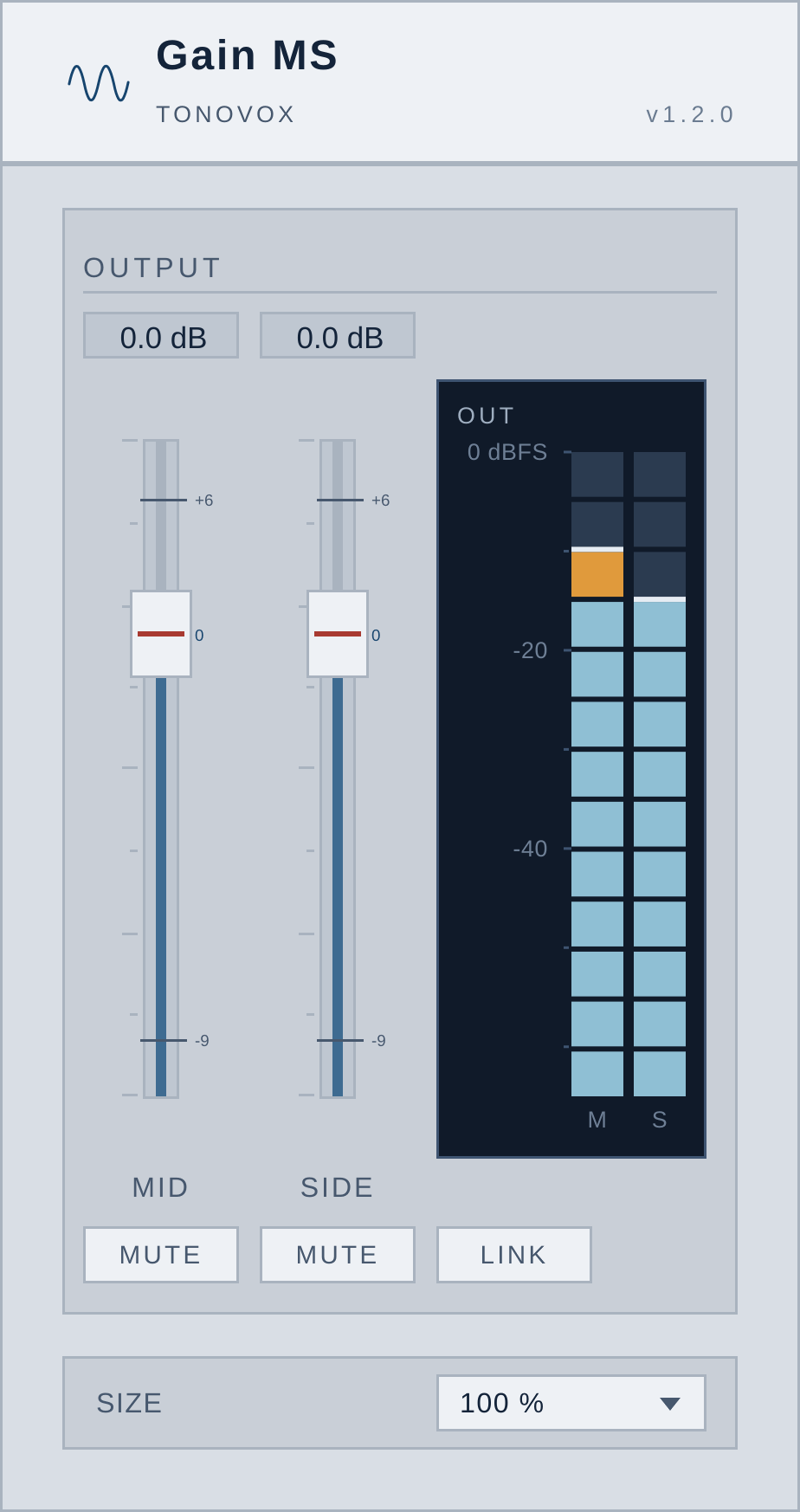
Gain MS is a mid/side gain plugin for VST3 hosts — a long MID fader, its twin SIDE fader beside it, the OUT meter that answers the two of them, a mute under each throw and a LINK that makes them one pair again.
It is the tail end of a wider Tonovox faceplate kept on its own: the one control every mix engineer already reaches for, given a plate of its own, stood up on its end and split into the two halves of a stereo signal. No filter, no compressor, no crosstalk, no tail — a gain stage, and nothing more.
- StatusAvailable
- PriceFree
- Version1.2.0
- FormatVST3 (64-bit)
- PlatformsmacOS (Apple Silicon) · Windows 11
- ControlsMID, SIDE, OUT, MUTE, LINK
Download Free · v1.2.0 · 28 MB zip · VST3
The plate
What Gain MS does
Five controls, on a 308 × 582 px plate. Every one of them is a plugin parameter, so your host automates it and recalls it with the session.
-
MID fader
The centre of the image on a long throw: −96 to +6 dB in 0.1 dB steps, with 0 dB at three quarters of the travel so fine trimming sits under the hand and the fade to nothing is at the bottom.
-
SIDE fader
The width, on a twin throw beside it, cut on the same curve — so one distance of hand means the same dB on either fader.
-
OUT meter
Two columns of 13 LED windows, −65 to 0 dBFS at 5 dB a window, post-fade and post-mute: it shows what the plugin hands back to the host, and it reads mid and side rather than left and right.
-
Mute, one per fader
A mute under each throw, ramped over 10 ms so it cannot click. Mute the side and you are in mono; mute the mid and you have the difference, out of phase.
-
LINK
Closes the two throws into one rigid pair: push either one and both caps travel the same distance in the same tick, so the balance you had already set stays set.
-
Nothing else
No EQ, no dynamics, no side-chain, no latency. Mid/side is a linear, exactly invertible transform, so the plate is a gain stage and your mix leaves it the way it came in — only at the level you asked for.
Mid/side
What is mid/side, in one sentence?
Mid/side — M/S, sometimes written mid/side or middle/sides — is another way of reading a stereo signal. The mid is what the left and right channels have in common: the centre, where the vocal, the kick and the snare live. The side is what differs between them: the width, where the pans, the room and the reverb live.
The transform is arithmetic, not filtering:
M = (L + R) / 2
and S = (L − R) / 2,
so L = M + S
and R = M − S
which is why it is exactly invertible and why an M/S gain stage costs nothing on the way back out. Turn the mid up and the centre of the mix gets louder without the width moving with it; pull the side down and the mix narrows towards mono without anything being filtered.
In the session
Where you would use it
- On the master bus — a dB of mid lifts the vocal, the kick and the snare out of a dense arrangement without pushing the reverb with them.
- On a stem or a printed mix — M/S gain is the shortest way to rebalance something you can no longer take apart.
- On a drum, guitar or synth bus — the side fader narrows a wide pad before it meets the rest of the arrangement, or opens it out without a pan law in the way.
- As a mono check — mute the side and hear what the mix is actually made of; mute the mid and hear only the difference.
- Anywhere a channel strip's M/S section is too far away — five controls, one plate, no menu diving.
Specifications
Gain MS at a glance
- Type
- VST3 plugin (FX / utility) — also builds as a standalone app
- Manufacturer
- Tonovox
- Version
- 1.2.0
- Price
- Free — no account, no licence key, no trial timer
- Platforms
- macOS 11 or later on Apple Silicon (arm64) · Windows 11 (x64)
- Hosts
- Any VST3 host — Cubase, Ableton Live, FL Studio, Reaper, Studio One, Logic Pro
- Controls
- MID gain, SIDE gain, MID mute, SIDE mute, LINK — 5 parameters
- Gain range
- −96 to +6 dB on both throws, snapping to 0.1 dB
- Meter
- 13 LED windows per channel, −65 to 0 dBFS, 5 dB a window, post-fade and post-mute, 60 fps
- Window
- 308 × 582 px plate, at 75 %, 100 % or 125 %
- Presets
- One program (Default); every control is automatable
- Download
- 28 MB zip, from /download/gain-ms
FAQ
Questions people ask about Gain MS
What is Gain MS?
Gain MS is a free mid/side gain plugin for VST3 hosts, made by Tonovox. It splits a stereo signal into its mid and side components, gives each one its own fader, meters both after the faders, and adds a mute under each throw and a link that pairs them again.
Is Gain MS really free?
Yes — it costs nothing and it asks for nothing. There is no account to make, no licence key to enter and no trial that runs out. The download is the plugin.
Which platforms and formats does it run on?
64-bit VST3, on macOS with Apple Silicon and on 64-bit Windows 11. The same build also runs as a standalone app, so you can hear it without opening a DAW. It is not an AU or an AAX plugin.
Does Gain MS change the sound?
Only its level. Mid/side is a linear, exactly invertible transform, so there is no filter, no crosstalk and no tail to colour the signal. With both throws at the same number the plate is a single output fader, dB for dB and bit for bit.
What does LINK actually do?
LINK makes the two faders one rigid pair: push either one and both caps travel the same distance along the throw in the same tick, so the gap between the two numbers stays where you set it. It is a parameter, so a session saved with the link closed comes back with it closed.
What is in the download?
One zip — gain-ms-1.2.0.zip, about 28 MB — holding
the plugin's source, the JUCE 9 tree it compiles against, the two
headless tests and the macOS and Windows installer scripts.
cmake -S . -B build then cmake --build build
gives you Gain MS.vst3 and the standalone app.
Will the download link go stale?
No. /download/gain-ms carries no
version in the URL and always answers with the current release;
?v=1.2.0 pins one, for a link that must never move.
The machine-readable version, size and checksum come from
/api/releases/gain-ms.
Download
Get Gain MS
Free, out now, v1.2.0 — a 28 MB zip, and no form to fill in first.
Download Gain MS VST3 · macOS (Apple Silicon) · Windows 11